Some recent changes to Ubuntu have changed the way we set a static IP in Ubuntu 12.04 and 12.10. Previously we could change the /etc/resolv.conf file adding in our static IP details. But due to some internal changes I’m finding it more stable to make changes in the graphical interface…. nm-connection-editor, as these new changes are overwriting the file with some generated content.
UPDATE: I have written some instructions on how to set a static IP in a more ‘Linux’ fashion. Check them out here (for wired connections only)
What do I need to set up a static IP?
You need to add some details which you may not know of the top of your head:
- Your chosen IP
- Netmask
- Gateway
- DNS Server
Where can I find these details?
Your chosen IP
Your router will most likely have a reserved range of IPs for static use, every domestic router I’ve used has reserved 100 – 200 (though you may have to check your router manual if you find its not).
Netmask, Gateway and DNS Server
Enter the following command in a terminal
|
1 |
nm–tool |
The output will list the details of your network interfaces, wireless and wired. In the section of the [Wired] interface there are some IPv4 Settings that will look something like below:
|
1 2 3 4 5 6 |
IPv4 Settings: Address: 192.168.1.67 Prefix: 24 (255.255.255.0) Gateway: 192.168.1.254 DNS: 192.168.1.254 |
- Address – current IP address
- Prefix – the address inside the brackets is the netmask
- Gateway – this is the gateway, otherwise known as the default gateway
- DNS – is your current DNS server
Setting the Static IP
To the set the static IP run this command in a terminal:
|
1 |
nm–connection–editor |
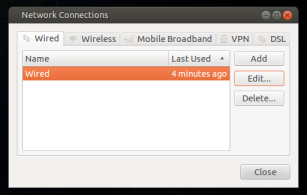
This will open the graphical network manager as seen below. If you have more than one connection, select the one you want to apply the static IP to, then click Edit.
This will open the Editing Wired dialog. It is in this box that we need to enter the information we found earlier. In the box below you can see my default settings before applying my static IP. Each of the values can be edited by clicking on them.
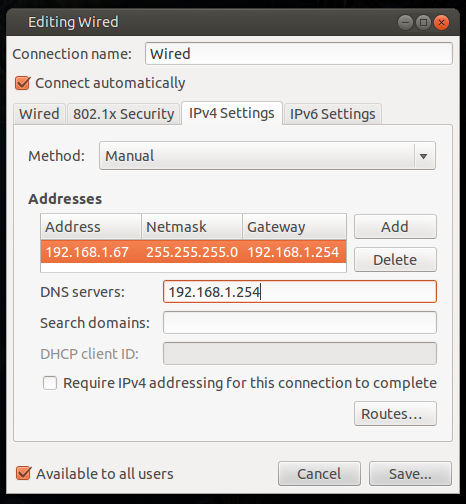
I’ve applied my changes, clicked save, nothing has changed?
Easy answer: Restart your computer
My answer: Enter the following few commands without the need to restart We need to restart some networking services to make sure we are using the most recent settings:
|
1 2 |
sudo service resolvconf restart sudo service networking restart |
If restarting these services has no effect go ahead and try a restart.
Now try the following again to make sure your changes are in effect:
|
1 |
nm–tool |
The output should reflect the static IP settings we retrieved earlier.
Hope this post helps you guys, any questions….. you know what to do.
Pingback: [ubuntu] Plexapp.com, port forwarding and static IP addresses | Ubuntu InfoUbuntu Info()
Pingback: [ubuntu] Plexapp.com, port forwarding and static IP addresses | WyldePlayground.netWyldePlayground.net -()
Pingback: [ubuntu] Plexapp.com, port forwarding and static IP addresses | James n Sheri.comJames n Sheri.com()
Pingback: Internet over wireless while connected to a LAN network()